 bmux
bmux· bmux guides
Best Bot Browsers in 2026: AdsPower, Multilogin, and More
Compare AdsPower, Multilogin, Incogniton, GoLogin, Dolphin Anty, and bmux for browser automation, profiles, API access, and pricing.

Introduction
Start with AdsPower for visual browser automation, Multilogin for browser profiles alongside cloud phones, and Incogniton for a small Selenium or Puppeteer setup. Add GoLogin for cloud browser workflows, Dolphin Anty for profile operations and scenarios, and bmux for a browser workspace controlled by your own scripts or agent.
“Bot browser” can mean a browser that manages separate accounts, a browser that executes automated steps, or both. This guide compares six options by those jobs, their automation interfaces, and the plan limits that affect the real cost.
We publish bmux. This is a comparison of vendor documentation and pricing checked on October 3, 2026, with bmux details checked against its source documentation. We have not run a controlled performance or detection test across these products. The recommendations are our assessment of the documented fit.
The hero illustration separates browser cards from an arm arranging task tiles: keeping profiles organized and doing work inside them are two different requirements.
Best bot browsers at a glance
Use this shortlist to choose two tools to try. The sections below link to the documentation behind each recommendation.
| Browser | Best fit | Automation interface | Main buying consideration |
|---|---|---|---|
| AdsPower | Building visual workflows across profiles | RPA, RPA Plus, Local API, AI Agent | Configure profile and member counts; check the automation features included |
| Multilogin | Managing browser profiles and Android cloud phones together | API, CLI, script runner; Selenium, Puppeteer, Playwright | Browser automation and native phone automation use different tools |
| Incogniton | A smaller scripted profile setup | REST API; Selenium and Puppeteer | API access starts with Entrepreneur, above Starter Plus |
| GoLogin | Profiles with a path to cloud browser work | REST API and SDKs; separate cloud browser offering | Desktop API access and hosted browser usage have their own plan requirements |
| Dolphin Anty | Organizing profiles and running visual scenarios | Scenario builder, synchronizer, API | Free profiles exclude API access; team seats affect the price |
| bmux | Inspecting and running your own browser procedures | CLI, DOM inspection, per-pane CDP commands | Free browser; you build and maintain the workflow |
The first five are sold around antidetect profiles and account operations. bmux belongs here as an alternative for developers whose main requirement is programmable browser work. Its profiles and device personas should not be read as equivalent to an antidetect vendor's fingerprint system.
What does a bot browser actually provide?
There are three separate things to evaluate: browser state, network routing, and task control. A profile holds a login's browser data. A proxy changes the route used for traffic. An automation interface lets a script, visual workflow, or agent operate the page.
The diagram keeps these responsibilities separate. Buying one capability does not establish that the other two are included.
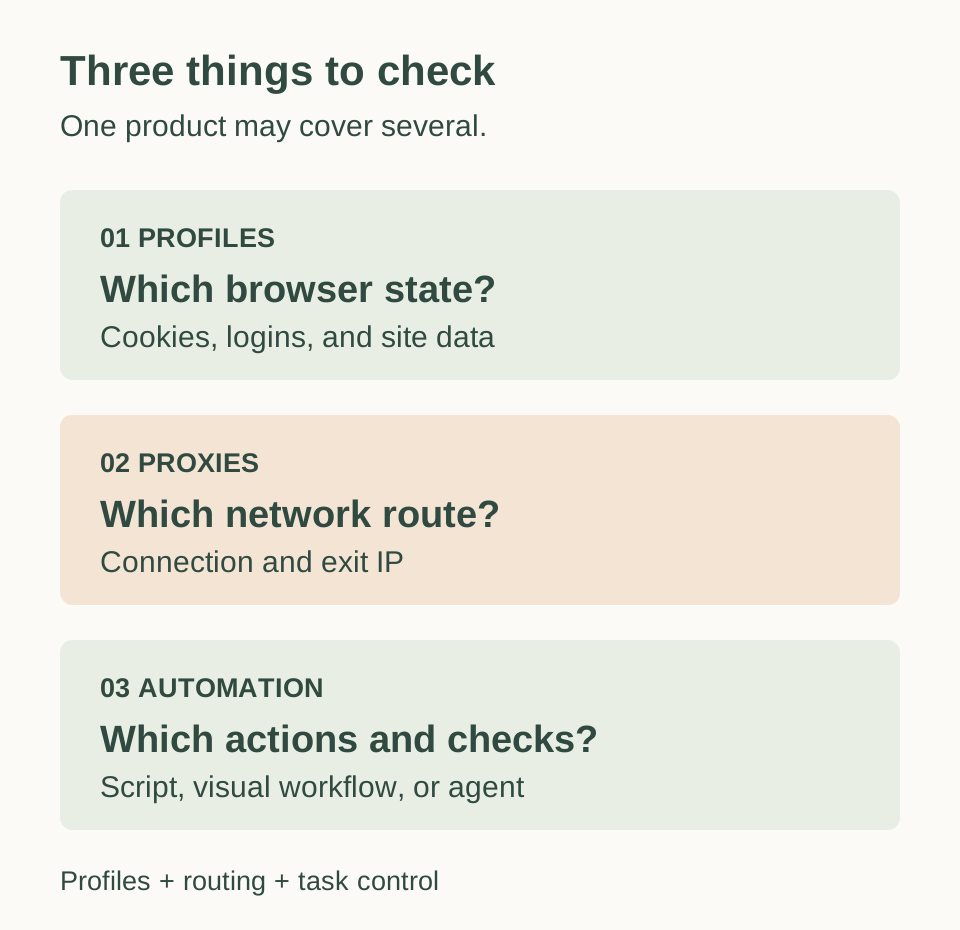 Conceptual diagram based on the linked product documentation. It describes responsibilities, not security guarantees or exclusive product categories.
Antidetect browsers also offer controls over the browser characteristics websites can observe. That is different from merely keeping cookies in separate profiles. Likewise, saving a profile in the cloud does not necessarily mean the browser itself runs on a hosted machine. Ask where the process executes and what must stay running for a scheduled job.
If your main goal is asking questions about pages, see our AI browser comparison. Here, the focus is persistent browser work and repeatable automation.
AdsPower: start here for visual automation
AdsPower is a useful first trial when you want to construct a workflow without maintaining a full automation application. Its RPA documentation describes templates, scheduled runs, and execution logs. RPA Plus adds reusable task management and debugging from a selected step. Scheduled processes require AdsPower to remain started and logged in.
For code, the Local API guide documents profile configuration and browser startup, including a headless service mode. Team members need the appropriate API permission. An API for launching a profile and a workflow for interacting with a website are distinct pieces of the setup.
AdsPower's September 2026 AI Agent announcement also describes natural-language profile creation and browser actions. That gives it another interface to evaluate, alongside RPA and scripts. A launch announcement establishes availability of a feature, not its success rate on your task.
Trial task: build a small export, run it twice, and deliberately change one input so the workflow fails. Check whether the log identifies the failed step and whether you can resume without repeating completed actions.
Multilogin: consider it for browser and phone operations
Multilogin's current product offering combines browser profiles and Android cloud phones. It is worth shortlisting when some work belongs on websites and some requires native mobile apps, with a shared operational platform for both.
Its automation FAQ documents API and CLI control, a script runner, and support for Selenium, Puppeteer, and Playwright. Cloud phone work uses a different route, including ADB and Appium. A browser script does not automatically become a native Android app script.
There is an access detail to verify during the trial: the pricing page lists API access on Free, while the Selenium example lists Pro 10 and higher. Test the exact browser startup and framework connection you need before relying on the free allowance.
Trial task: start an existing browser profile from your preferred framework, read a known page value, and close it cleanly. If phone work is part of the purchase, test that separately and record mobile minutes as well as proxy traffic.
Incogniton: a clear option for a smaller scripted setup
Incogniton is worth a look for existing Selenium or Puppeteer scripts. Its plan comparison separates profiles from automation: Entrepreneur includes 50 profiles, REST API access, and Selenium/Puppeteer integration; Starter Plus excludes those interfaces.
Budget $29.99/month for Entrepreneur, rather than $19.99 for Starter Plus. Longer commitments have discounted equivalents. Free Starter provides 10 profiles for two months, then three, without the paid automation features.
Trial task: connect your existing script to one profile, restart the browser, and verify that it restores the expected state. For team use, also test profile transfer and the permissions available on the plan you intend to buy.
GoLogin: compare the desktop and cloud paths separately
GoLogin spans desktop profile management and hosted browser products. Its pricing matrix currently puts REST API and SDK access in Professional 100, above the smaller personal plans. It lists cloud browser access through the web on Professional 50 and 100. Those are different capabilities.
The separate browser for AI agents page describes persistent cloud sessions controlled through automation, with browser usage and proxy traffic as cost considerations. This makes GoLogin relevant if you want hosted execution, but the desktop profile subscription alone is not enough information to estimate that workload's bill.
Trial task: save a profile, end the session, and reopen it through the interface you plan to use in production. Verify the saved state and inspect the usage meter. Ask specifically which subscription and usage charges cover that route.
Dolphin Anty: profile organization with visual scenarios
Dolphin Anty's product page emphasizes profile operations, a scenario builder, and API automation. It is a useful candidate when people need to organize profiles and run defined procedures from the same application.
The current pricing page offers five free profiles and a Starter configuration of 20 profiles at $10 per month. Its comparison lists no API access on Free. Larger plans add team options; Base shows 100 profiles at $89 per month, with additional users charged separately.
Trial task: build one scenario, run it across two test profiles, and inspect how results identify each profile. If several people will operate it, evaluate profile sharing and user permissions on the intended team plan.
bmux: a workspace for scripts and browser agents
bmux is free and open source. It combines sessions, split panes, floating references, persistent profiles, and an automation CLI. It is a fit when you want to inspect a real browser while keeping a procedure in code. Your script or external agent supplies the task logic.
The automation guide covers navigation, DOM inspection, clicking, typing, waits, and screenshots. Advanced operations use per-pane CDP commands. This is a command interface through Electron's debugger, not a Playwright connection endpoint. If your workflow depends on attaching an existing Playwright script unchanged, account for that difference.
The capture shows a floating reference beside the main workspace. That layout helps when you are checking a procedure against instructions or a second page.
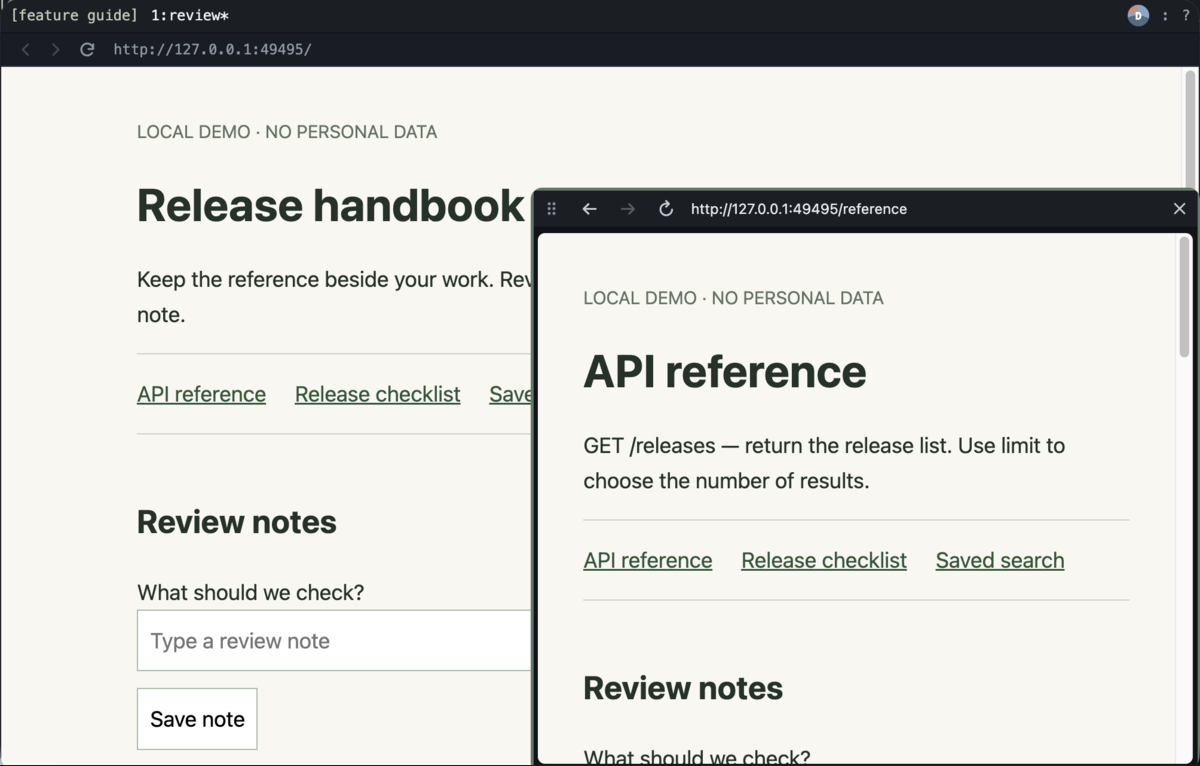 Existing bmux capture from a disposable Tart environment with local sample pages. It demonstrates the layout, not comparative automation performance.
Profiles retain browser state and support per-profile HTTP, HTTPS, or SOCKS5 connections. Mobile personas adjust browser presentation; the engine remains Chromium. An iPhone persona does not provide Safari or a native iOS device. Profiles also do not restrict the current user's CLI to a single account.
Trial task: implement a small read-only export with an explicit success check. Inspect its page in a pane, then rerun the same procedure from a script. Our scheduling guide shows how a scheduler can launch reusable browser scripts. You are responsible for the host, scheduling, and script maintenance.
Compare the cost of the workflow you will actually run
The table records public pricing checked on October 3, 2026. Dollar amounts are USD. Monthly billing is identified explicitly; annual equivalents require the longer commitment. These are different packages, so the table is not a price ranking. Taxes, extra seats, traffic, and hosted execution can change the total.
| Product | Free allowance | Relevant paid example | What to verify |
|---|---|---|---|
| AdsPower | 2 profiles | Configurable profiles and members; obtain the live quote | API limits, member permissions, and RPA/RPA Plus access |
| Multilogin | 5 profiles; one-time traffic and phone-minute bonuses | Pro 10: $11/month billed monthly | Exact framework access, team seats, traffic, and phone minutes |
| Incogniton | 10 profiles for 2 months, then 3 | Entrepreneur: $29.99/month billed monthly, 50 profiles | API access begins above Starter Plus |
| GoLogin | 3 profiles | Professional 100: $39/month, or $19.50/month equivalent billed annually | REST API/SDK tier; separate hosted browser charges |
| Dolphin Anty | 5 profiles; no API access | Starter: $10/month for 20 profiles | Team features, additional users, and selected profile count |
| bmux | Free browser and automation CLI | No browser subscription | Your host, proxies, any external model, and maintenance time |
Write down the profile count, simultaneous running sessions, team members, and expected monthly traffic before comparing quotes. A plan that stores 100 profiles does not establish that your machine or hosted allowance can run all 100 at once.
A small trial tells you more than a feature count
Give two candidates the same job using accounts and pages you control. For example: open the right profile, load a report, apply a date filter, export the result, and verify the date range. Add a controlled failure so you can see how the tool behaves when a step cannot complete.
| Check | What to record |
|---|---|
| Profile continuity | Does reopening restore the intended browser state? |
| Correct account | Can you identify the active account before the first write? |
| Failure handling | Is a missing button reported clearly, with enough context to fix it? |
| Repeatability | Does a second run produce the expected result without duplicate work? |
| Human inspection | Can you view the current page and understand where execution stopped? |
| Operating cost | Which profile, seat, traffic, runtime, or model allowances were consumed? |
Treat “undetectable” claims as marketing rather than a measured guarantee. This comparison does not establish that any browser avoids a website's detection or account restrictions. A useful success criterion is completing the intended work correctly and reporting failures clearly.
Frequently asked questions
What is the best free bot browser?
For your own scripts and a local browser workspace, bmux provides a free CLI without a browser subscription. For antidetect profile management, the vendors above offer small free allowances with different restrictions. Check automation access separately: a free profile allowance may only cover manual use.
Which bot browser is best without coding?
Start by comparing AdsPower's RPA workflow and Dolphin Anty's scenario builder. Build the same short task in both and inspect their failure logs. Visual construction reduces the amount of code you write, but the procedure still needs checking when a website changes.
Is an antidetect browser the same as a bot browser?
The terms overlap, but describe different concerns. Antidetect products focus on browser profiles and observable browser characteristics. Automation requires a way to execute actions, such as an API, RPA workflow, or agent. Check both if your task needs both.
Do I need a proxy for browser automation?
Only when your task requires a particular network route. A proxy does not supply task logic or turn a browser into a mobile device. Our profile proxy guide explains the connection setup and its limits in bmux.
Which browser should you choose?
For a first shortlist, compare AdsPower and Dolphin Anty for visual workflows, Multilogin for browser and phone operations, Incogniton for a smaller Selenium or Puppeteer setup, and GoLogin for desktop profiles plus cloud options. Choose bmux when you want a programmable workspace and will maintain your own scripts or agent.
The best bot browser is the one whose profile model, automation interface, and running costs fit the same job. Start with one real procedure, verify its output, and buy the plan that supports that procedure.