 bmux
bmux· bmux guides
Best AI Browser in 2026: Choose by the Work You Do
Compare Comet, Chrome with Gemini, Edge, Dia, ChatGPT, and bmux for research and automation, with current access limits and free-plan tradeoffs.

Introduction
For research, start with Comet. If you already use Chrome or Edge, try their built-in assistants first. For work across tabs and connected tools on a Mac, consider Dia. For repeatable browser automation with your own scripts or agent, consider bmux. The best AI browser depends on whether you need an answer, a completed action, or a workflow you can run again.
This comparison covers those choices, their access limits, and a small test you can use before switching. We publish bmux, so we have a stake in this comparison. The recommendations draw on linked product documentation checked on October 2, 2026.
The hero illustration shows the three jobs behind this choice: reading sources, acting on a page, and repeating a procedure. They need different kinds of browser support.
Best AI browsers at a glance
Use this table as a shortlist. Each product's section below explains its features and links to supporting sources.
| Browser or tool | Best fit | What to check before choosing |
|---|---|---|
| Perplexity Comet | Research with an assistant beside your pages | Free download; verify your plan's assistant limits and platform features |
| Chrome with Gemini | Adding AI to an existing Chrome workflow | Desktop auto browse has account, region, language, subscription, and rollout requirements |
| Edge with Copilot | Page, PDF, and tab assistance for existing Edge users | Browse with Copilot is a separate capability; consumer access is rolling out to US Microsoft 365 Premium subscribers |
| Dia | Bringing tabs and connected work tools into a shared context | macOS; Windows is listed as coming soon. The free browser plan has no AI features |
| bmux | Repeatable automation, separate profiles, and agent-controlled panes | Free, open-source browser; you supply the scripts or agent and any model service |
| ChatGPT browser | Browser tasks inside an ongoing ChatGPT conversation | A built-in browser with a separate profile; not the former standalone Atlas browser |
A chat sidebar and an agent that operates a website are different capabilities. Installing a browser does not necessarily give you access to both.
AI assistant, browser agent, or reusable script?
An AI browser assistant helps interpret content: summarize a page, explain a document, or compare sources. An agentic browser can also act: click controls, fill forms, and follow a task across pages. A reusable browser script follows steps you have implemented and can run without asking a language model to choose every action.
The diagram shows the difference in who determines the next step. These are workflow patterns; a single product can support more than one.
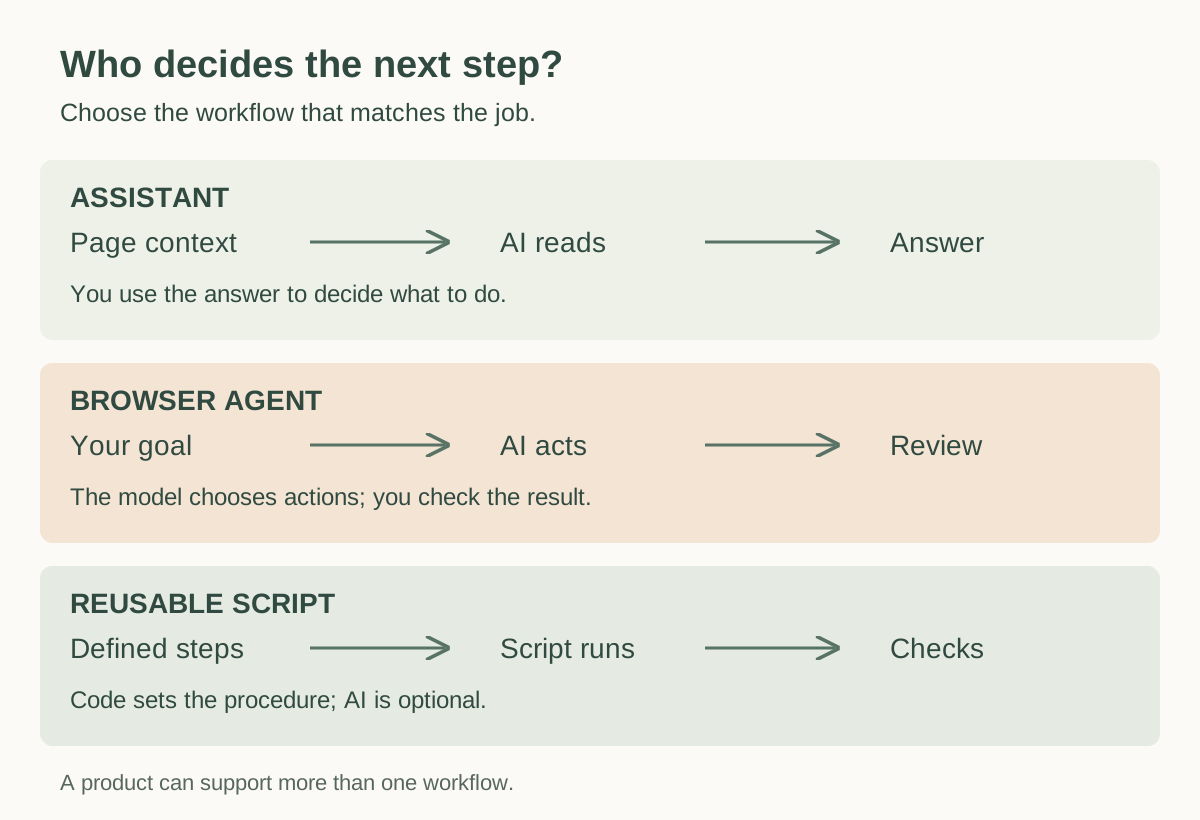 How assistants, agents, and reusable scripts determine the next step, based on the interfaces linked below.
For a one-off comparison, an assistant may be enough. For an unfamiliar website task, an agent can help discover the steps. For a stable weekly export, a script can make the procedure explicit and record what happened. The script still needs maintenance when the site changes.
Comet: a starting point for AI-assisted research
Comet puts Perplexity's assistant beside your browsing. Its documented capabilities include questions about open tabs, web search, and interaction with websites on your behalf. That combination makes it a sensible first trial if your work starts with several sources and ends with a comparison or decision. See the Comet assistant and data FAQ.
The current Comet product page lists Mac, Windows, iOS, and Android. Perplexity made the browser free to download, but a free download should not be read as unlimited access to every assistant feature. Check the allowance shown for your account.
Try this: open three product documentation pages and ask for a comparison with a source link for every important claim. Check whether the answer distinguishes missing information from an actual limitation. That is more useful than judging the assistant by how confident its summary sounds.
Chrome with Gemini: try your existing browser first
Chrome is a practical first choice if your bookmarks, extensions, and accounts already live there. Google's January 2026 product update describes the shift toward auto browse: AI that can help carry out tasks as well as answer questions.
For desktop auto browse, Google's current requirements include US availability, age 18 or over, English device language, and an eligible Google AI Pro or Ultra personal account. Access is gradual. Managed accounts have separate administrator requirements. Verify the feature on your own account before paying for a workflow that depends on it.
Mobile deserves a separate check. Google announced Gemini in Chrome for US Android users in August 2026, with auto browse for AI Pro and Ultra subscribers. Desktop and phone feature availability should not be assumed to match.
Choose it when: the AI features you need are available in the Chrome setup you already use. Keeping your current browser can remove a migration step from the experiment.
Edge with Copilot: page help and browser actions have different access
Copilot in Edge supports questions and summaries involving web pages, videos, PDFs, and open tabs. Microsoft's getting-started guide explains how browsing context can contribute to answers and where to turn that access off.
For actions, check Browse with Copilot specifically. Microsoft documents clicking, typing, and navigation in your Edge browser, with the ability to watch and take over. Its current support page says consumer access is rolling out to Microsoft 365 Premium subscribers in the US.
Choose it when: you already work in Edge and want help with the pages or PDFs in front of you. If your goal includes form completion or other website actions, confirm that Browse with Copilot is available; seeing a Copilot sidebar alone does not establish that.
Dia: work context across tabs and connected tools
Dia emphasizes questions and synthesis across browser tabs and connected work tools. Its product page describes profiles, splits, connected context, reports, and meeting preparation. It currently lists macOS availability and Windows as coming soon.
The published plans distinguish a free Better Browser tier with no AI features from Better Answers at $20/month and Better Days at $100/month. Usage limits apply. This is a meaningful difference for anyone searching for the best free AI browser: the browser being free does not make its AI free.
Choose it when: your problem is bringing scattered work context together, and you are comfortable connecting the relevant tools. Test it with a real question spanning two sources you use regularly, then check that its answer cites the right project and time period.
bmux: browser automation with your own scripts or agent
bmux is a browser workspace with an automation interface. It provides sessions, split and floating panes, separate browser profiles, and commands for reading and interacting with pages. Your own script or external agent supplies the procedure. The browser automation guide documents navigation, DOM inspection, clicks, typing, waits, and screenshots.
This makes bmux worth considering for developers who want to keep a working browser procedure as code. A script can check for an expected page, perform known steps, and record an output without requiring a model call on each run. An agent can help build or repair the script, or handle tasks that need interpretation. You are responsible for that setup and maintenance.
The capture below shows a reference pane beside the main workspace. This is useful when you need to inspect a page while keeping instructions or another source in view.
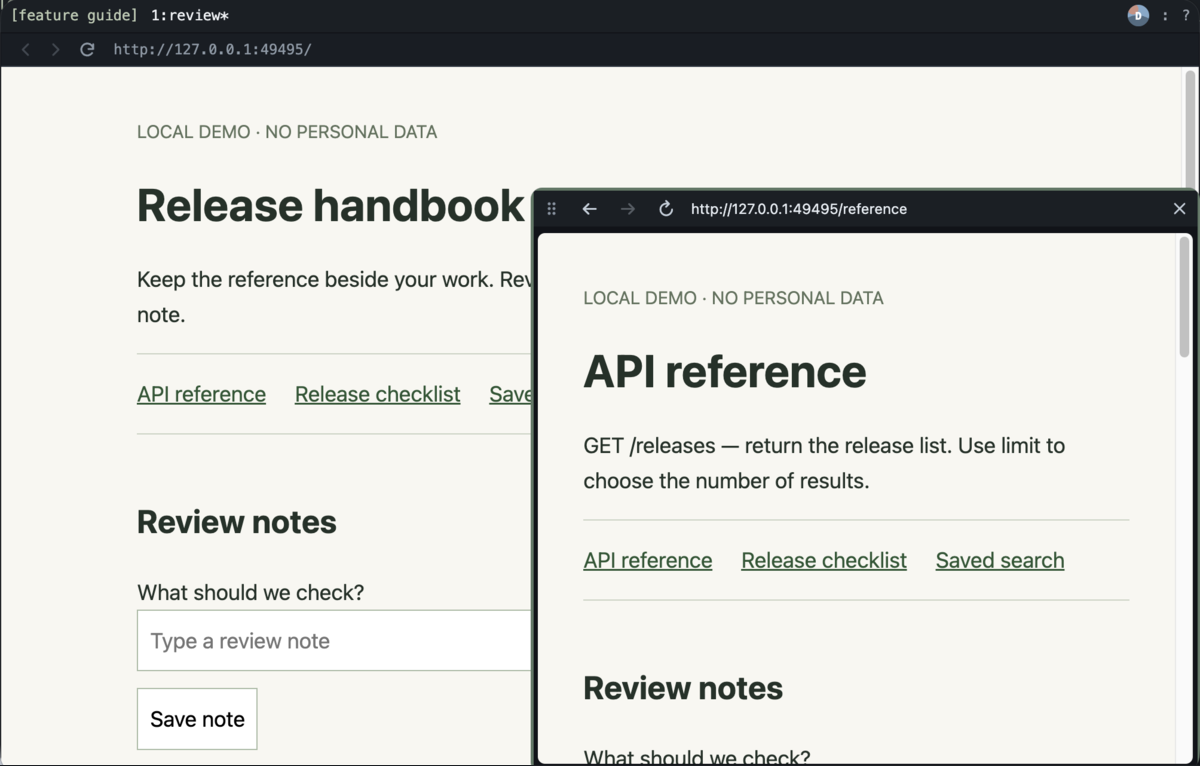 A floating reference pane beside the main bmux workspace.
Read the floating panes guide for the layout, and the scripts-first scheduling article for a worked design in which a scheduler launches reusable scripts.
bmux is free and open source. An external model, remote host, or proxy can add costs. Its automation protections can also pause work; the documentation explains the limits. Profile separation helps organize logins, but the local CLI can operate across profiles, so profiles should not be treated as an authorization boundary for an agent.
Choose it when: you want explicit browser control and are willing to maintain the workflow. If you want an integrated assistant ready to chat immediately, start with one of the other options.
What happened to ChatGPT Atlas?
Older “best AI browser” lists often recommend Atlas as a standalone download. OpenAI's Atlas transition notice gave August 9, 2026 as its stop-working date and directed browser-based work toward ChatGPT and Codex. We would not choose Atlas as a new standalone browser now.
The current ChatGPT browser documentation describes a built-in browser for research and website interaction. In the desktop app it has a separate profile from your regular browser. OpenAI also documents a browser extension for working with existing supported browser tabs.
For readers comparing Comet vs Atlas, the useful current decision is Comet versus today's ChatGPT browser workflow. Choose based on where you want the task to live, which logged-in context it needs, and how you will review the result.
How to compare AI browsers on your own work
Pick two candidates and give them the same small task. Use a sample account or public pages first. Keep the input and success condition fixed so you can see whether a difference comes from the browser, your prompt, or the source material.
| Test | Example | What to inspect |
|---|---|---|
| Source comparison | Compare three tools against five written requirements | Correct links, missing facts, and unsupported claims |
| Page interaction | Fill a sample form and stop before submitting | Correct fields, selected options, and a clear stopping point |
| Repeatability | Repeat the same export with different dates | Consistent output, explicit failure, and a record of the run |
| Human takeover | Pause halfway through and inspect the page | Whether you can understand the current state and resume safely |
| Account limits | Run a realistic batch of your normal tasks | Actual quota messages and which steps require a paid feature |
Record completion, corrections, and the result you verified. A fast answer with the wrong source or a form filled in the wrong account is a failed task.
For privacy, inspect what page content is sent to the assistant, which tabs it can access, and whether it can act in signed-in accounts. A locally running browser does not establish that AI processing stays on the device. Keep final submission, publication, or purchase under your review until you have verified the workflow.
Frequently asked questions
What is the best free AI browser?
Comet is a reasonable starting point because the browser is free to download and includes an assistant experience. Verify the limits of the features you need. bmux is free browser infrastructure for your own scripts or agent; any external AI service has its own costs. Dia's current free plan excludes AI.
What is the best AI browser for automation?
For natural-language tasks, compare the available action features in Comet, Chrome, Edge, and ChatGPT. For procedures you want to define and rerun as code, consider bmux. Decide first whether you want the model to choose the steps each time or a script to execute a known procedure.
Can an AI browser replace browser automation scripts?
It can handle some tasks that you would otherwise script. That does not make every task a good candidate. A frequently repeated procedure with clear inputs and checks may be easier to maintain as a script; a changing, one-off task may benefit from an agent. Test the actual website and required output.
What is the best AI browser for Mac, Windows, or Android?
Start with platform availability, then verify the AI feature itself. Comet lists all three. Dia currently lists macOS with Windows coming soon. Chrome's Android AI rollout and desktop auto browse have their own eligibility rules. A platform download and access to an agent are separate checks.
Which one should you choose?
Start with the job you repeat most. Try Comet for research, Chrome or Edge for assistance in a browser you already use, and Dia for connected work context on a Mac. Use ChatGPT's browser when the work belongs in that conversation. Consider bmux when you want browser procedures you can inspect, script, and run again.
For that last path, start with the bmux automation guide. Build one small workflow with an explicit success check. The best AI browser is the one that reliably completes your work within the access, cost, and maintenance limits you can accept.