 bmux
bmux· bmux guides
Floating Panes vs Split Panes: Choosing the Right bmux Layout
Compare floating panes, splits, and internal windows. Open references, dock live panes, and keep useful layouts in bmux.
Walkthrough transcript
Start with the review page. Open an API reference in a split. Float the reference above the workspace. Return the same pane to a split.
Introduction
Use a split when two pages deserve a permanent place in the workspace. Use a floating pane when a reference needs to sit above the page you are working on. Use another internal window when the task needs its own layout.
bmux added persistent floating panes on September 19. You can lift an existing pane out of a split, open a link into a float, and dock it again. The pane keeps its profile and live page throughout the move.
The walkthrough above shows that sequence inside a disposable Tart macOS VM. The pages are local examples. It is a paced sequence of native window captures, not a timing benchmark.
Floating panes, split panes, and windows compared
| Layout | Best use | Trade-off |
|---|---|---|
| Split panes | Compare a document with an editor, or watch two dashboards | Each page gets less width |
| Floating panes | Consult a reference or inspect a link temporarily | The float covers part of the page underneath |
| Internal windows | Keep separate tasks and their layouts together | You switch windows to see the other task |
A floating pane belongs to its internal bmux window. It is not a separate macOS window, and it does not remain above every application. This makes it useful for a reference that belongs to one task, rather than a desktop-wide overlay.
For a broader comparison, macOS also has window tiling. That arranges application windows. bmux splits and floats arrange browser panes inside a workspace.
Open a reference without rearranging the workspace
Right-click a link and choose Open Link in Floating Pane. The destination opens above your split layout. This is useful when you want to read an API definition without replacing the page that led you there.
You can do the same from Click Mode: double-tap Option, press f, then type the link hint. Choose the pane action before the hint.
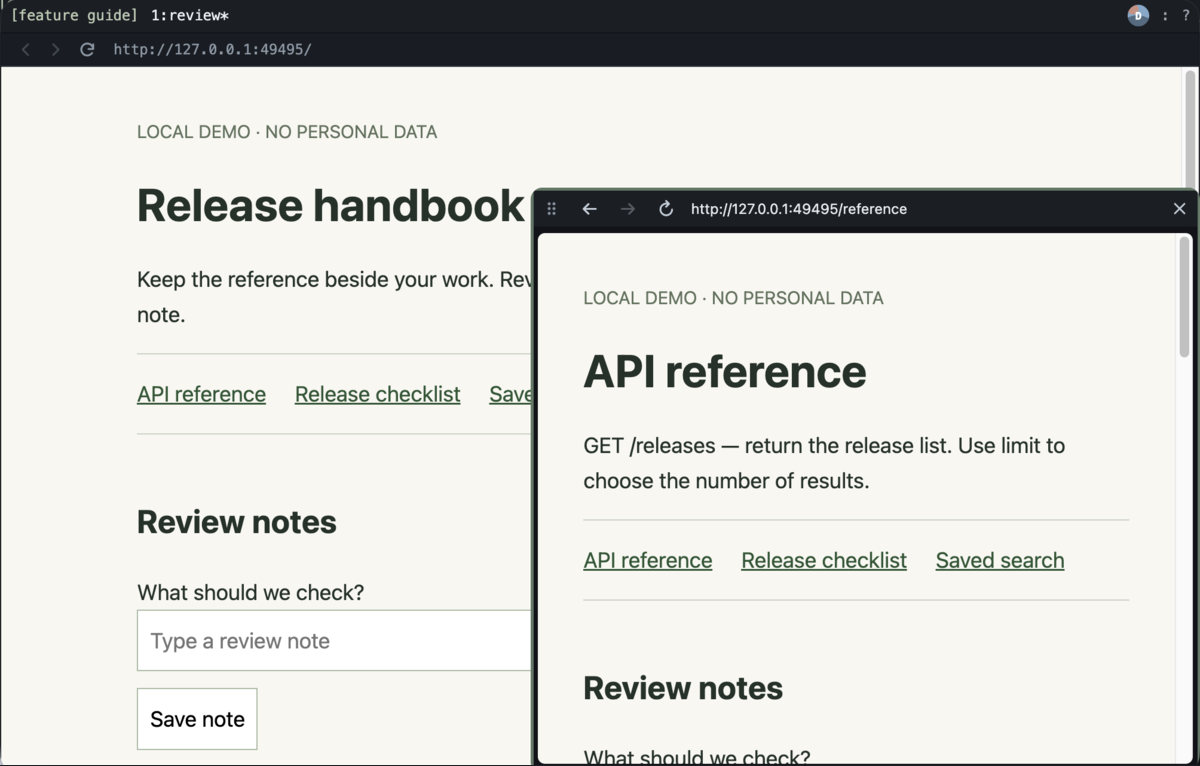 Native bmux capture in Tart. The local reference overlaps the review page; no personal browser data is shown.
This capture shows the reason to float a reference: the review page retains its full layout beneath it. The cost is overlap. If you repeatedly move the reference to read the content underneath, it probably belongs in a split.
Float and dock an existing pane
Right-click a pane's page or address bar and choose Float Pane. Drag its header to move it. Drag an edge or corner to resize it. Selecting a float brings it to the front of the other floats.
To dock it again, right-click the floating header and choose Return to Split. bmux restores its former split position when that position is available. Move to Window moves the pane into another internal window.
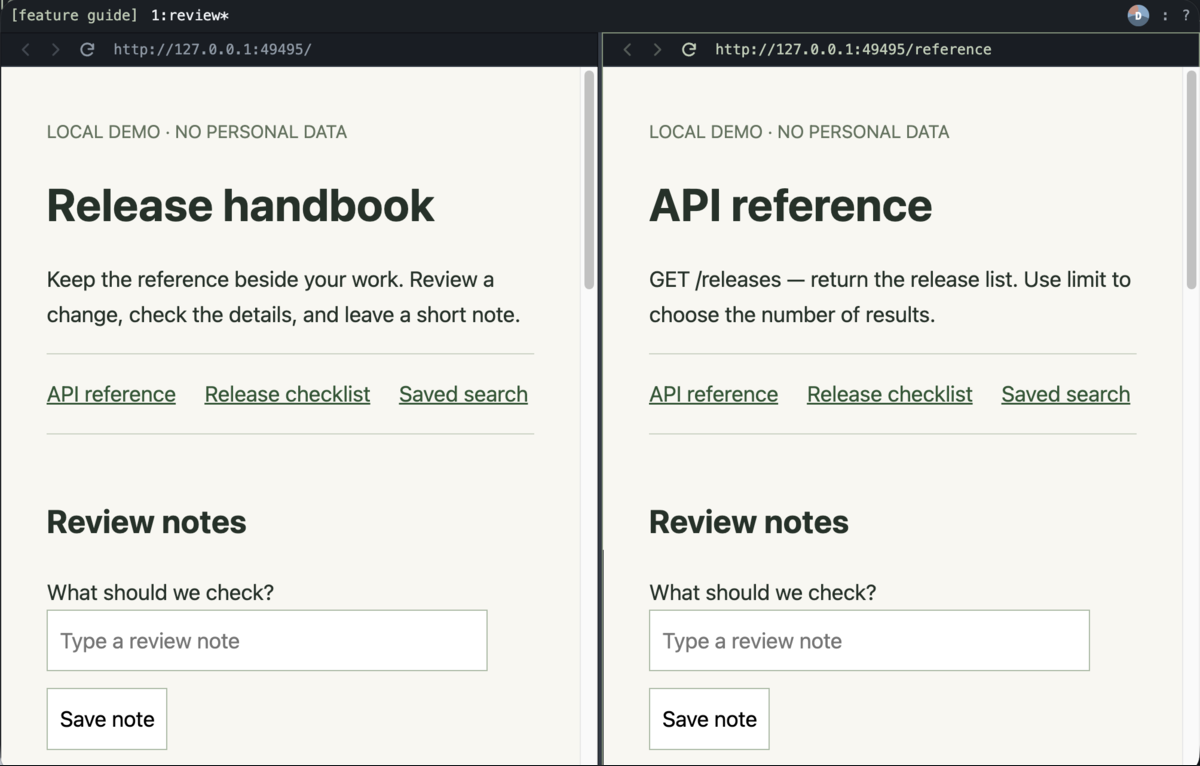 The same local reference pane after docking in Tart. Both pages are visible without overlap.
Docking is useful when a quick lookup turns into sustained comparison. Floating and docking keep the live page rather than deliberately navigating it again. A browser restart is different: bmux reopens URLs but cannot reconstruct arbitrary JavaScript memory or unsaved forms.
Useful commands and shortcuts
The command prompt accepts new-pane to create a float, break-pane -W to float the selected pane, and join-pane to return it to a split. Open the prompt with Control+B, then :.
For scripts, supply an explicit source pane. Replace PANE_ID with a pane ID from your workspace:
bmux move-pane -t PANE_ID --x 100 --y 80bmux resize-pane -t PANE_ID --width 640 --height 480Coordinates are pixels inside the workspace, excluding the status bar. They are not desktop screen coordinates. See the floating-pane reference for docking and window moves.
To make Command+W close a selected float while retaining window closing for tiled panes, merge this into your existing keyboard configuration:
keyboard: shortcuts: Cmd+W: close-pane-or-windowFloating panes FAQ
Do positions survive a restart?
Yes. Positions, sizes, and stacking order are saved. The page itself reloads after the browser has stopped, so saved placement does not guarantee saved form contents.
Does floating change the login or profile?
No. A pane's profile is fixed for its lifetime. Moving that pane preserves its profile and page. Create another pane when you need a different profile.
Can I float a post on a JavaScript-heavy site?
The context menu includes support for resolving X post detail links. Other sites depend on an actual link or a supported context-link hook. See browser tools.
Which layout should I start with?
Start with a split for pages you use together throughout a task. Float a temporary reference. Dock it when overlap becomes inconvenient. The useful addition is being able to change that decision without replacing the pane.