 bmux
bmuxIntroduction
bmux uses Electron because its main requirement is a browser workspace that behaves like tmux: persistent sessions, internal windows, split panes, and agents that browse in the background. Electron gives us Chromium page rendering and APIs for composing and moving page views without maintaining a Chromium fork.
The decision was made on September 10, 2026, when the project was called Browmux. Two scope decisions made Electron practical: inactive attachments could show snapshots instead of a second live rendering, and ordinary Chrome extension compatibility was not required for the first version.
That was a tradeoff about page ownership and maintenance. It was not a measured claim that Electron would use less memory or CPU than another browser.
Sessions own pages independently of desktop windows
In bmux, a desktop window is a client attached to a session. Closing that client detaches it; the running application can keep the session's pages available. Quitting the application ends the live pages. After restarting, saved layouts and URLs can be reopened, but arbitrary JavaScript and form state cannot be restored.
The model separates browser storage from workspace layout:
| Entity | Responsibility |
|---|---|
| Profile | Cookies, cache, site storage, and background execution policy |
| Session | A named collection of internal windows |
| Internal window | A saved split layout containing panes |
| Pane | Tabs using one profile |
| Tab | A live browser page with a stable application ID |
| Client | A desktop window displaying an attachment to a session |
Profiles are independent of sessions. Panes in one layout can use different profiles, while panes using the same profile share its logins. See the session model and agent guide.
The Electron main process manages the workspace state and live page objects. A BaseWindow contains the application interface and multiple WebContentsView objects for browser pages. Electron leaves the lifetime of those pages to the application, including when a containing window closes. That makes explicit resource cleanup part of our responsibility. Electron BaseWindow documentation
The screenshot below shows the visible result: three real Chromium page views arranged as one split layout. It illustrates pane composition, not the background lifetime of those pages.
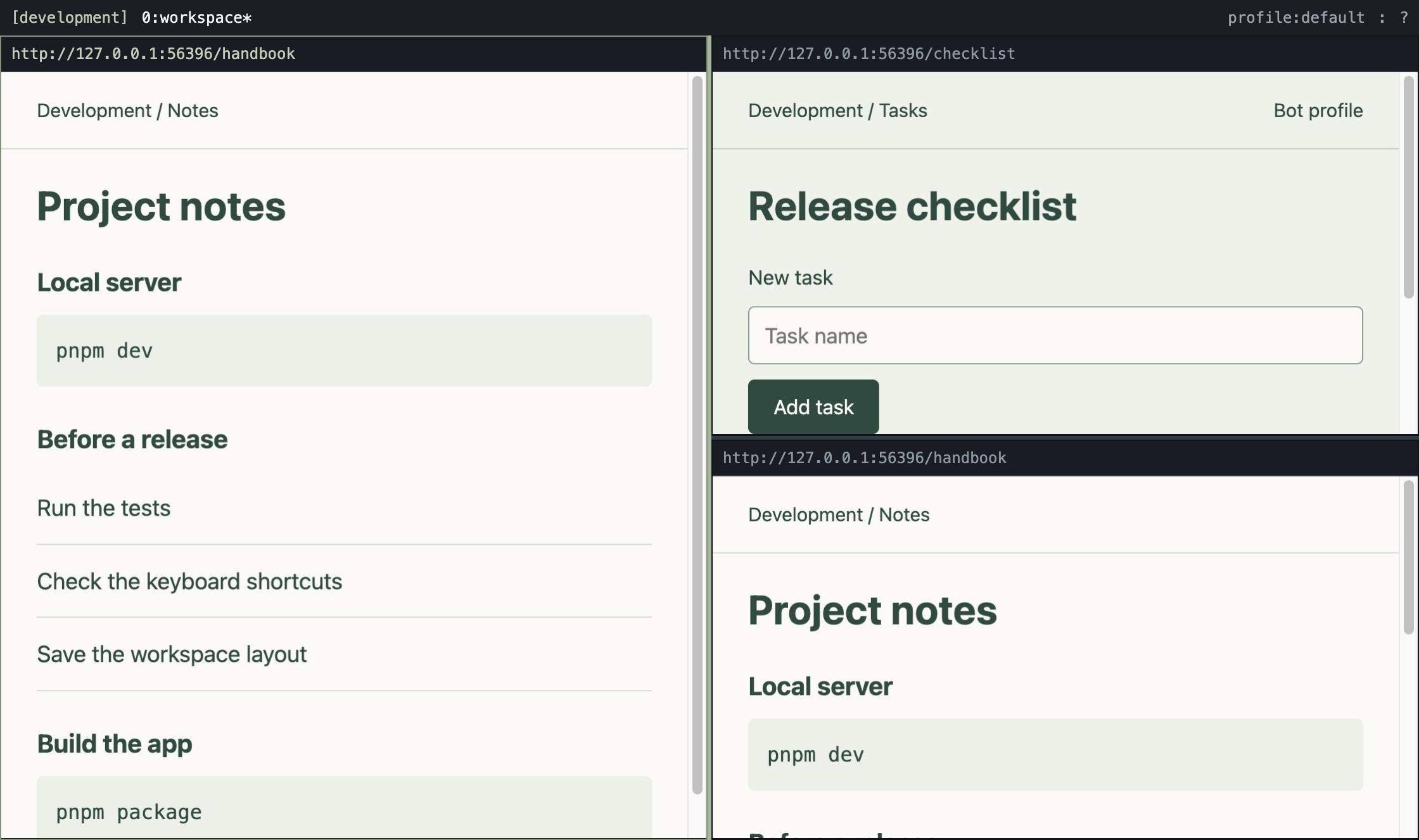
Source: the bmux product capture, recorded with local fixture pages in a disposable Tart instance.
One live view can move between attachments
The original idea allowed several desktop windows to attach to the same session. We did not need every attachment to render and interact with the same page simultaneously. The focused attachment could own the live views while another showed captured images.
That distinction matters because a single Electron WebContents can appear in only one WebContentsView at a time. Snapshots avoid introducing continuous streaming or duplicate page instances just to display the same session elsewhere. Electron WebContentsView documentation
The handoff model is:
- Capture the previously displayed pages for its preview.
- Move the existing live views to the controlling client.
- Size those views for the client's selected layout.
- Keep tab identity and live page state intact.
Changing where a view is attached does not require navigating to the URL again. A snapshot is a preview; it is not an independently interactive copy of the page. Unattached pages can be parked in hidden hosts until needed.
Agents work without selecting your workspace
Agent commands target pages by explicit IDs. They can navigate, inspect the DOM, execute JavaScript, send input, and take screenshots without selecting the human client's internal window or activating the application.
Bot profiles keep background pages running. Ordinary inactive pages can remain throttled. This is an execution policy for a browser profile, not a separate OS account or an authorization boundary against the local CLI.
Electron exposes background throttling controls and a debugger interface for Chrome DevTools Protocol commands. bmux uses CDP for full-page screenshots; an ordinary page capture only provides a viewport image. Electron webContents documentation
The implementation lives in the browser runtime. Hidden hosts, persistent profile partitions, page creation, view transfers, and screenshot handling implement this ownership model.
Why we chose it over the alternatives
We initially leaned toward a Chromium fork when normal browser extensions were a core requirement. Dropping that requirement for v1 changed the balance: the main work became the session manager and its interface.
| Approach considered | Useful starting point | Why we chose a new Electron application |
|---|---|---|
| Chromium fork | Existing browser features and normal extension environment | Sessions independent of desktop windows and custom split layouts would require changes across browser internals, plus ongoing upstream integration and builds |
| Splitser | An Electron browser with panes and workspaces | Its window-owned webview structure would need restructuring for pages that outlive clients and move between attachments |
| CEF | Direct Chromium embedding | Combining arbitrary tiling with the desired full browser functionality needed more investigation; it was not an obvious shortcut |
| CDP wrapper around Chrome or Brave | Reuse existing browser processes, profiles, and automation | Capturing and forwarding input would add a display transport; CDP does not transplant another browser's native interface into bmux |
| Zen | Related workspace and window-sharing behavior | It uses Firefox, while Chromium rendering was a project requirement |
These were project-specific assessments, not benchmarks or claims that the alternatives cannot implement this model. Electron let us express the workspace through application APIs while keeping Chromium as the page engine. A fork would have required integrating the same model into Chromium's tab management, native windows, page lifetime, and session restoration.
The costs we accepted
Electron does not supply an entire Chrome browser. Navigation controls, downloads, permissions, history, popup handling, and crash recovery still need application code. Engine updates also require verification, even when upgrading Electron is simpler for this project than maintaining a browser fork.
Keeping pages alive consumes resources. Snapshots avoid duplicate live pages, but do not make retained pages free. Background execution and inactive-page throttling need deliberate policies; architecture alone does not establish a performance advantage.
Extension support was excluded from the original version. bmux later added experimental support and compatibility work. That does not turn it into a complete Chrome extension environment: Electron supports a subset of extension APIs, and compatibility must be checked per extension. See the current extension guide for capabilities and limitations, and Electron's extension support for the underlying constraints.
The reason for choosing Electron remains the same: it provides the page engine, native view composition, and automation hooks needed to build bmux's session model with a manageable application codebase.