 bmux
bmux· bmux guides
This Week in bmux: Swipe Navigation, Pinned Windows, and Translation
The October 5–11 bmux update adds macOS swipe navigation, pinned windows, recent-window search, selected-text translation, bookmark controls, and clearer profile settings.
Introduction
The October 5–11, 2026 update makes everyday browsing easier to organize: swipe through page history on macOS, pin useful windows, find recently visited windows, and translate selected text without leaving your source page. It also adds bookmark controls and clearer settings for profiles and automation.
This is a roundup of features merged during the week. The v0.1.8 release includes the additions made since v0.1.7; some earlier changes in this roundup already shipped in v0.1.6 or v0.1.7. The screenshots show the real bmux interface with sample pages in a disposable browser profile.
Find your place with pins, recent windows, and better search
Right-click a status bar tab and choose Pin Window to keep a frequently used internal window on the left as an icon. Pins survive a restart. Press Command+. on macOS or Control+. on Linux and Windows to toggle the current window's pin. Pinned and regular windows stay in their own groups when reordered.
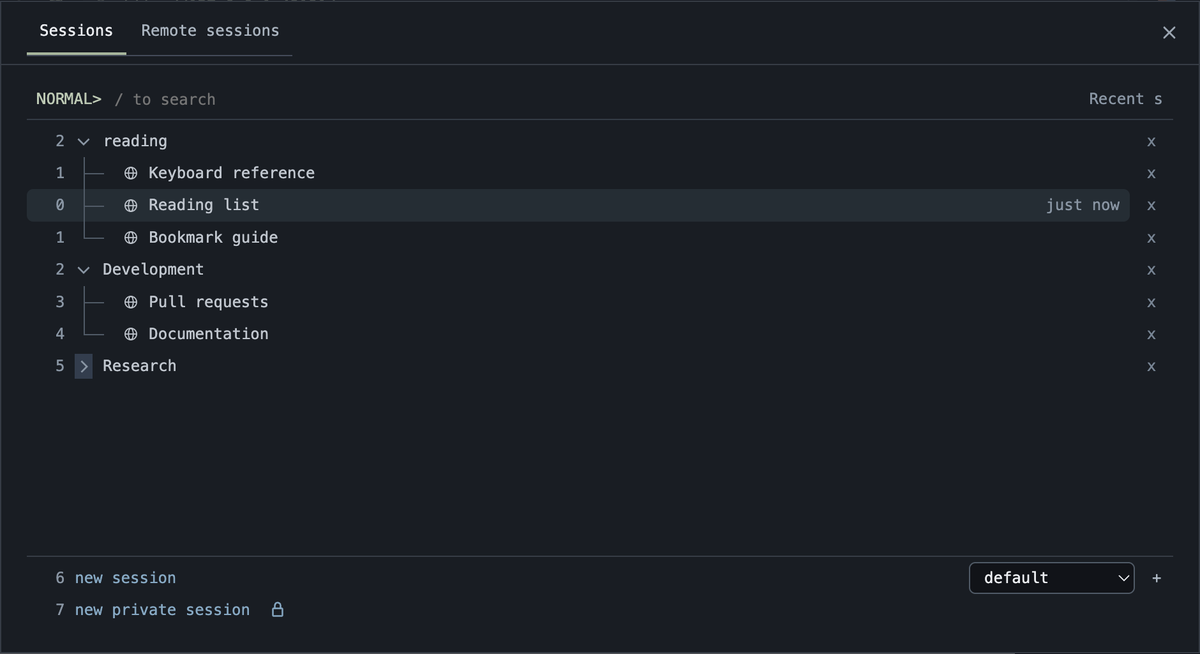
The session picker now has collapsible window trees and a Recent view that lists windows individually. Visit times survive restarts, and background page loading does not make a window look newly visited. Sound indicators help identify which session or window is playing audio. Search gives matching session names more weight, filters weak fuzzy matches, and prioritizes the go back row when you search for it.
 Recent lists visited windows individually.
| What you want to do | New control or behavior |
|---|---|
| Keep a useful window close | Pin it from its tab menu or with Command+. / Control+. |
| Return to something you used recently | Select Recent in the session picker |
| Reduce a long session list | Collapse its window tree |
| Find where audio is coming from | Look for the playing-sound indicator in picker rows |
| Open a window with the mouse | Use the + button beside the tab strip |
Dragging tabs now animates the reorder preview. The new + button makes the existing new-tab action accessible with the mouse. Keyboard documentation covers the shortcuts and pin behavior.
Press Command+Shift+N to create a private session and switch to it immediately. This gives the existing private-session feature a direct shortcut.
Navigate history with a macOS swipe
On macOS, swipe horizontally with two fingers over a page to go back or forward. The page preview moves with the gesture. Navigation follows the pane under the gesture, so a split workspace does not send the other pane through its history.
Ordinary links that open a new internal window can return you to their source with Back or a swipe. The address bar also favors clean host or path destinations when completing a URL. Suggestions remove duplicate destinations and common tracking parameters while retaining matching page titles. You can still choose a specific history result when that is the page you want.
Background links now defer their first navigation until you select their tab. This changes when those pages start loading; it is not a measured memory or speed improvement. Foreground mobile popups still load immediately.
Translate selected text in a separate popup
Select text on a page, right-click it, and choose Translate. bmux opens Google Translate in a separate popup with automatic source-language detection and English selected as the destination. Your source window stays selected. Press Escape to close the popup.
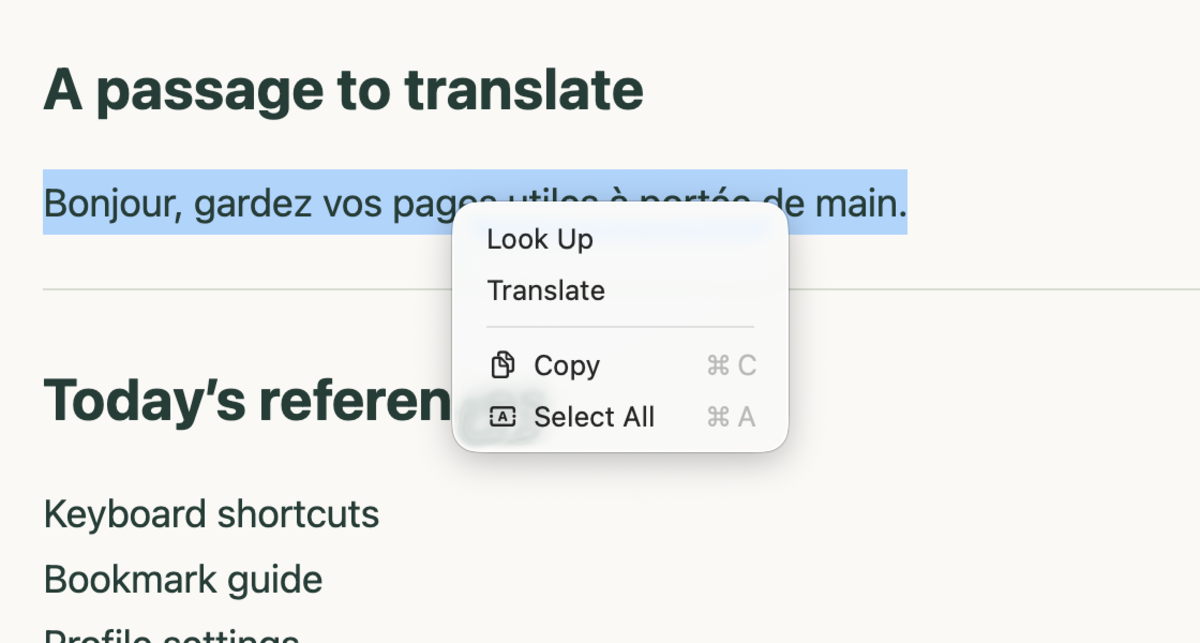 Select a passage and choose Translate from the native context menu.
bmux passes the selected text to Google Translate; it does not translate locally. The text is sent to that service in its page URL. The popup uses the source page's browser profile session. See Google's translation help for the translation service itself.
Save and maintain bookmarks from the picker
The bookmark list now includes a + button for the current page and a + beside each folder to save directly into it. Enable All profiles to search bookmarks across profiles. Opening one uses the profile it belongs to.
Right-click bookmarks or folders for rename and delete actions. Folder chevrons collapse groups, while Reorder bookmarks reveals drag handles. Option+Up/Down on a handle also moves an item within its folder. Outside clicks dismiss the bookmark menu without accidentally activating the row behind it.
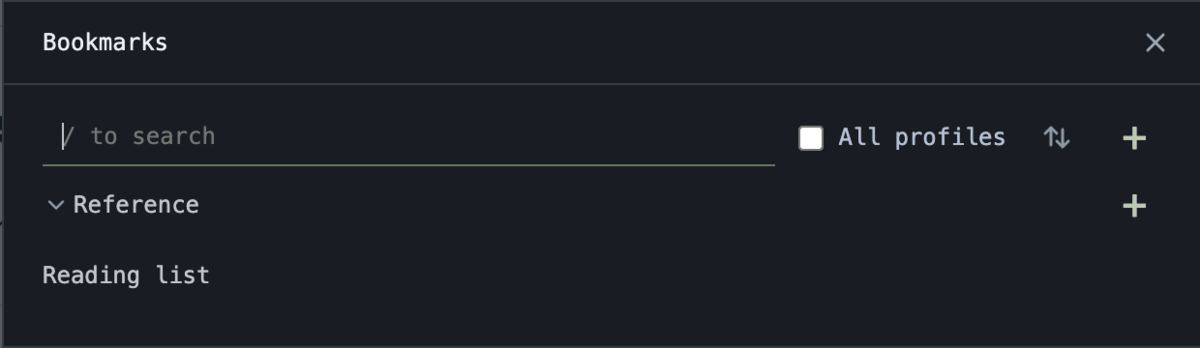 Save the current page with +, or use the folder's + to choose its destination.
These controls build on the editable search parameters described in the bookmark article. That guide explains how a saved website search can expose price, keyword, or date filters when the website supports them in its address.
Keep profile settings and automation status easier to read
Profile settings are organized into Overview, Pane, Device, Connection, and Anti-bot tabs with icons and titled sections. Keep Page Loaded now lives in Pane. Use it for a page whose in-memory state you need to retain; the memory guide explains its relationship to idle unloading.
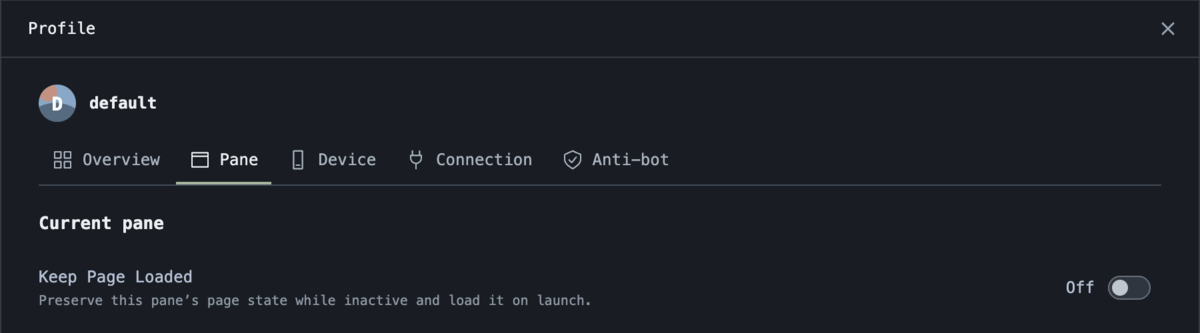 Keep Page Loaded is in the profile's Pane tab.
Settings remember unfinished drafts while you move between panels. Saved changes refresh the remembered values, and connection settings remain in place while you inspect other profile options. Approved profile storage permissions persist across restarts.
Anti-bot settings expose profile-specific automation session limits, break duration, and social-site action delays. Paused automation appears above the controls when attention is needed. Notices identify the affected pane and agent, and permission requests provide Go to pane, Deny, and Allow actions in the same notice bar.
| Scope | Controls |
|---|---|
| Profile | Default Anti-bot switch, automation limits, excluded websites |
| Pane | Protection override and Keep Page Loaded |
| Website in a profile | An exclusion for its exact hostname |
| Current alert | Dismiss, inspect settings, or use the available resume/reset action |
The alert's Disable anti-bot menu offers For 15 minutes, For 1 hour, or Until removed. The settings list also accepts a hostname or URL for a persistent exclusion. An exclusion skips session limits, social-site pacing, and warning checks for that hostname in that profile. Other profiles and websites keep their settings. Dismissing a notice only hides it; it does not resume automation or reset its session.
These controls help you inspect and configure bmux's automation guard. They do not guarantee that a website will accept automated activity. The agent guide explains warning pauses, exclusions, and the human resume and reset actions.
Install the update
The week also included reliability work: remote viewers ignore stale disconnect messages after reconnecting, native file pickers retain their owning window during pane changes, and outgoing documents release unfinished stylesheet work. Windows installer checks now exercise the installed package on a disposable Windows desktop. These changes are recorded in the source history; they are not performance benchmarks.
Get the platform download from the bmux homepage or the v0.1.8 release page. Start with one change that fits your workflow: pin a reference window, switch the picker to Recent, or translate a passage while keeping the original page open.
The week's changes are recorded in the public source history. The additions above focus on keeping your place in the workspace and making the controls you need easier to reach.