 bmux
· bmux guides
bmux 0.1.13: Configure browsing and review its decisions
Browsing profiles, playback and decision controls, recording context, and session-limit fixes shipped in bmux 0.1.13 for macOS and Linux.
Introduction
bmux 0.1.13 brings browsing setup, playback controls and decision details closer to the page. It also makes recordings easier to find and gives website bots and ClawTab jobs clearer session-limit controls.
This update picks up after bmux 0.1.12. It covers the changes shipped in the 0.1.13 macOS and Linux packages. At the 0.1.13 release, Windows remained on 0.1.12 because the 0.1.13 installer did not pass release validation. The table below records availability at that cutoff; use the download page for newer releases.
Set up a browsing session in one form
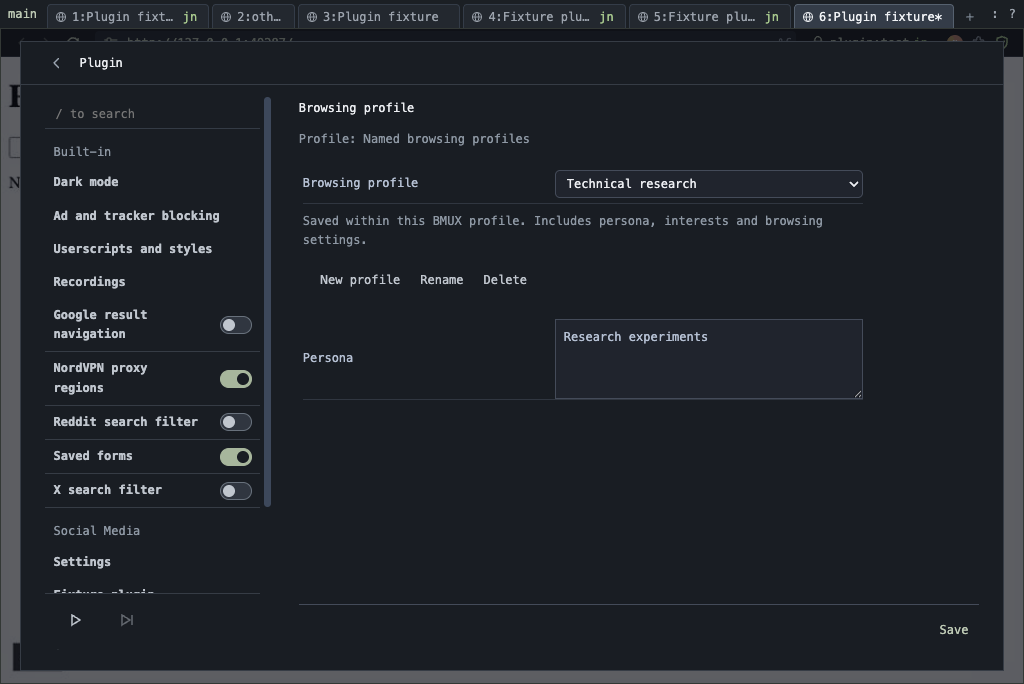
When a compatible Social Media plugin is installed, browsing opens with editable settings, grouped platforms and named configurations. Saved defaults let you repeat a setup without entering every choice again. Profile editing keeps the persona, interests and browsing settings together within the current bmux profile.
You can create or rename a browsing profile, copy the current settings, or start from a provided template. Setup also keeps AI-access and subscription controls beside the browsing options.
Social plugins are local packages installed and enabled separately. The X, LinkedIn and Reddit examples in this release's source checkout are under optional-plugins/; they are not bundled into the app. See the plugin guide for installation and configuration.
Read the decision beside the page
The browsing overlay now shows decision branches, their probabilities when provided, and the active choice. Playback controls sit beside the current action. Pause the run or move to the next post from that panel, and open Settings or Usage for more detail.
The compact view keeps the current action and playback controls visible while taking less space. You can resize or collapse the overlay. Errors remain visible, and a completed overlay clears when its pane navigates instead of leaving the previous run's controls on a different page.
The overlay guide explains how installed plugins supply progress, decisions and controls. These are host capabilities; the actions available in a session depend on its plugin.
Find a recording by its context
Social Media recordings are grouped by context, with recording labels and agent details retained. A skipped capture also keeps its context, which makes it easier to understand where it belongs when reviewing a session later.
Captures now finish writing before they close, improving reliability when several recordings stop together. The recordings guide covers local recording controls and storage.
Adjust limits from an alert
Website and ClawTab job alerts now expose their session-limit controls. Website bots are grouped into a compact list, and the job clock disappears when its limit override is removed.
Closed browser panes retain their agent attribution and Codex resume command in alerts. You can identify the conversation behind the activity even after its original page has closed.
Browser fixes and smaller controls
Hand controls make it easier to pan around a locked viewport, with better focus around page margins and zoomed views. The browsing profile editor shown above keeps the persona and browsing settings together; viewport panning is a separate improvement in this release.
Reddit and X search bookmarks can filter connection prompts and show page-local hidden-post counts and match details when the relevant platform integration is installed. Extensions opens with Command+E on macOS. The CLI also adds tmux-style switchc targets and client options for moving between browser workspaces.
Downloads and platform availability
Read the 0.1.13 release notes for the complete list, or inspect the full comparison from 0.1.12. macOS and Linux packages are attached to that release; the main download page offers the newest verified release with a complete set of platform downloads.