 bmux
bmux· bmux guides
bmux 0.1.9: Inline Vim Editing, Bookmark Plugins, and Stable Window Numbers
bmux 0.1.9 adds inline Vim editing for website fields, keyboard bookmark navigation, Reddit search plugins, and stable window numbers.
Introduction
bmux 0.1.9 brings Vim editing into website fields, adds keyboard navigation and plugins to bookmarks, and keeps window numbers stable when tabs move. This release also improves profile management, address searches, translation, and automation notices.
This article covers the additions since v0.1.8. Start with the feature that fits your browsing: edit a draft in place, keep a saved search's filters with its bookmark, or reorder a workspace without changing its numbered shortcuts.
Patch update: bmux 0.1.10 includes these features and fixes Vim editor initialization on newly loaded pages. It also groups profile creation and deletion under a single Manage profiles control.
Edit website text with Vim, in the page
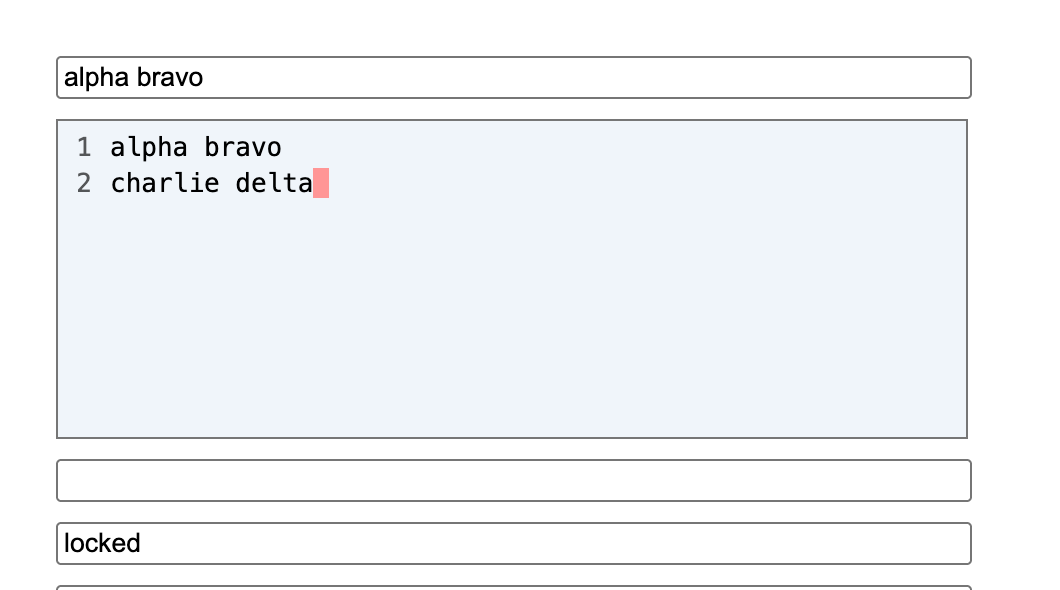
With Vim editing enabled in General settings, focus a website text field and press Ctrl+E, or click its small v hint. The editor takes the field's place in the page layout and starts in Normal mode. Use i to type, motions and operators to edit, and Visual mode to select text. Relative line numbers make counted movements easier to follow.
The screenshot above shows the inline editor in a local test page. The surrounding form stays in place, and the editor uses the original field's width and background. Both screenshots in this article come from a disposable bmux profile in Tart.
| Action | Keys or behavior |
|---|---|
| Start typing | i |
| Find a character | f / F, then the character; ; repeats |
| Save and return to the website field | Escape in Normal mode, :wq, zz, or ZZ |
| Mark a save checkpoint without closing | :w |
| Restore the last checkpoint and close | :q; before a checkpoint, restores the opening text |
Edits reach the original field live. Website character counts and controlled inputs can update while you type. bmux does not submit the form when you close the editor, but the site's input handlers and autosave can run during editing. A save checkpoint belongs to the Vim editor; it is separate from a website's Save or Publish button.
The same setting enables Vim editing in addresses, rename fields, and bookmark search. Yanks and pastes share the system clipboard. Deletes and changes preserve its existing contents. Passwords, one-time codes, and short structured fields retain native editing. Rich-text drafts contain plain text; embedded media and formatting are outside the draft. The keyboard guide covers supported fields, shortcuts, and draft recovery.
Navigate bookmarks and keep settings beside the list
The bookmarks panel now puts the list and settings side by side. Hover a row to select it, then move into its settings without losing the preview. Keyboard navigation takes over until the pointer moves again. Each side scrolls independently.
Use j and k, counted movements such as 3j, or gg and G to move through visible rows. Relative numbers show each row's distance from the selection. Press / to edit the search. In Normal mode, o opens the selection in the current tab and Shift+O opens a new internal window. Same-tab opening requires the current pane's profile.
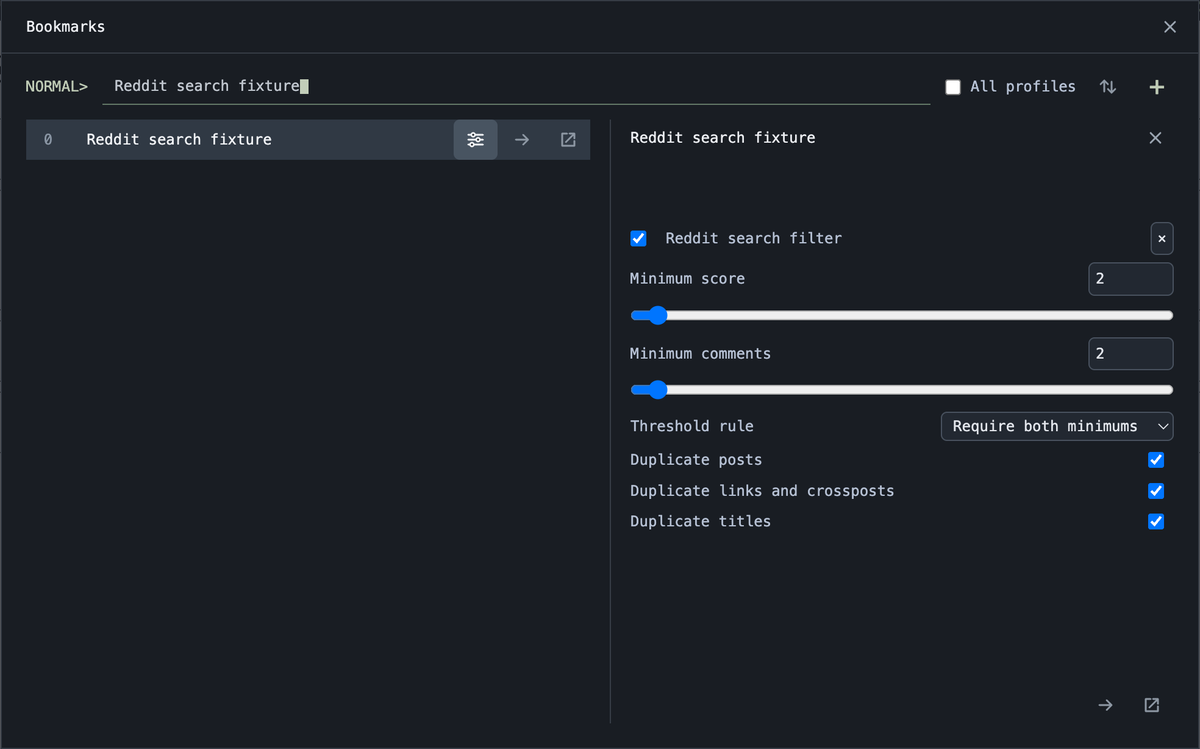 Real bmux capture in Tart with a local search fixture. The settings demonstrate the bundled Reddit filter; the page is not live Reddit.
The capture shows the settings beside their bookmark. Search, selection, scroll position, collapsed folders, and the All profiles preference survive restarts locally. Reordering filtered results preserves unrelated saved entries, and clicking a title keeps the panel open so you can inspect it before opening a page. Deleting a bookmark or folder now asks for confirmation, with Cancel focused first. See the bookmark guide for the full controls.
Attach a Reddit search filter to a bookmark
Enable Reddit search filter in Plugins, open a Reddit search bookmark's sliders, and choose it under Add plugin. Set minimum score and comment counts, choose whether both or either minimum must match, and configure duplicate post, link, and title filtering.
The filter works on loaded search results, including results added by infinite scrolling. It leaves unknown counts visible and does not fetch more posts. It applies to Reddit searches rather than feeds or discussion comments.
Opening that bookmark attaches its plugins to the resulting pane. Ordinary panes and links opened in new panes do not inherit the attachment. A compact page overlay lets you toggle the filter or configure it; changes update the bookmark and its existing panes. Turning it off restores hidden results. The bookmark plugin documentation explains attachment scope and persistence.
Reorder windows without changing their shortcuts
Window numbers now stay with their windows when you reorder, pin, or close tabs. If you move window 3 to the left, its numbered shortcut and command target still select window 3.
Moving to an index still uses the destination's position in the displayed list. When you want consecutive numbers again, press the prefix, then E, or run renumber-windows. The tmux-style equivalent is movew -r.
| Operation | Result |
|---|---|
| Reorder or pin a window | Its number stays the same |
| Close another window | Surviving windows keep their numbers |
| Select a numeric command target | Selects the window with that number |
| Explicitly renumber | Assigns numbers from 1 in displayed order |
This makes a numbered workspace easier to rearrange while preserving the targets you already use. The keyboard documentation includes selection and movement commands.
Smaller browsing changes
Address suggestions put search first for ordinary text, including numeric queries. You can still select a domain completion or a specific history result. History retains original redirect URLs so a remembered visit can reopen its original address.
Selected-text translation now opens Google Translate in a floating bmux pane. The selected text is sent to Google Translate. Image context menus add Copy image address. Session rows show page icons and visit times colored by age; remote viewing opens within a temporary session. Tab release animations settle from the mouse's drop position.
Automation cooldown notices use compact circular countdowns, and blocked-site notices stack so concurrent alerts remain visible. Bitwarden passkey requests open the unlock window when the vault is locked. Unsaved-change prompts keep the live page visible behind them and remain tied to its browser window while address suggestions are open.
Profile settings include creation and management controls beside the default-profile selector. In 0.1.10, open Manage profiles, then use New profile. Creating a profile selects it as the session's default for new windows. You can also delete an unused profile after confirmation; deletion clears its site storage and HTTP cache. The default profile and profiles used by open panes or saved layouts are protected from deletion.
Get the release
Download bmux 0.1.10 from the release page or the homepage. Packages cover macOS Apple Silicon and Intel, Windows x64, and Linux x64 and arm64.
For a first try, focus a draft and press Ctrl+E, or open bookmarks and navigate with j and k. Both keep the work in its existing context. The 0.1.9 feature release notes, 0.1.10 patch notes, and complete commit comparison cover the rest of the release.